
Find a Grindr profile by name, in seconds.
Type a name or a keyword. It scrolls your Grindr Web grid and outlines every match.
- Free
- Sends nothing anywhere
- Chrome, Brave, Edge, Arc
- iPhone & Android (beta)
- Type names or keywords
- It scrolls the grid for you
- Every match, outlined in coral
Try it on your own grid.
One link by e-mail: open it on your computer for the extension, or on your phone for the mobile version.
New · Beta
Now on your phone.
Grindr Web in Safari on iPhone or Firefox on Android: the same search, in a panel that leaves the grid visible.
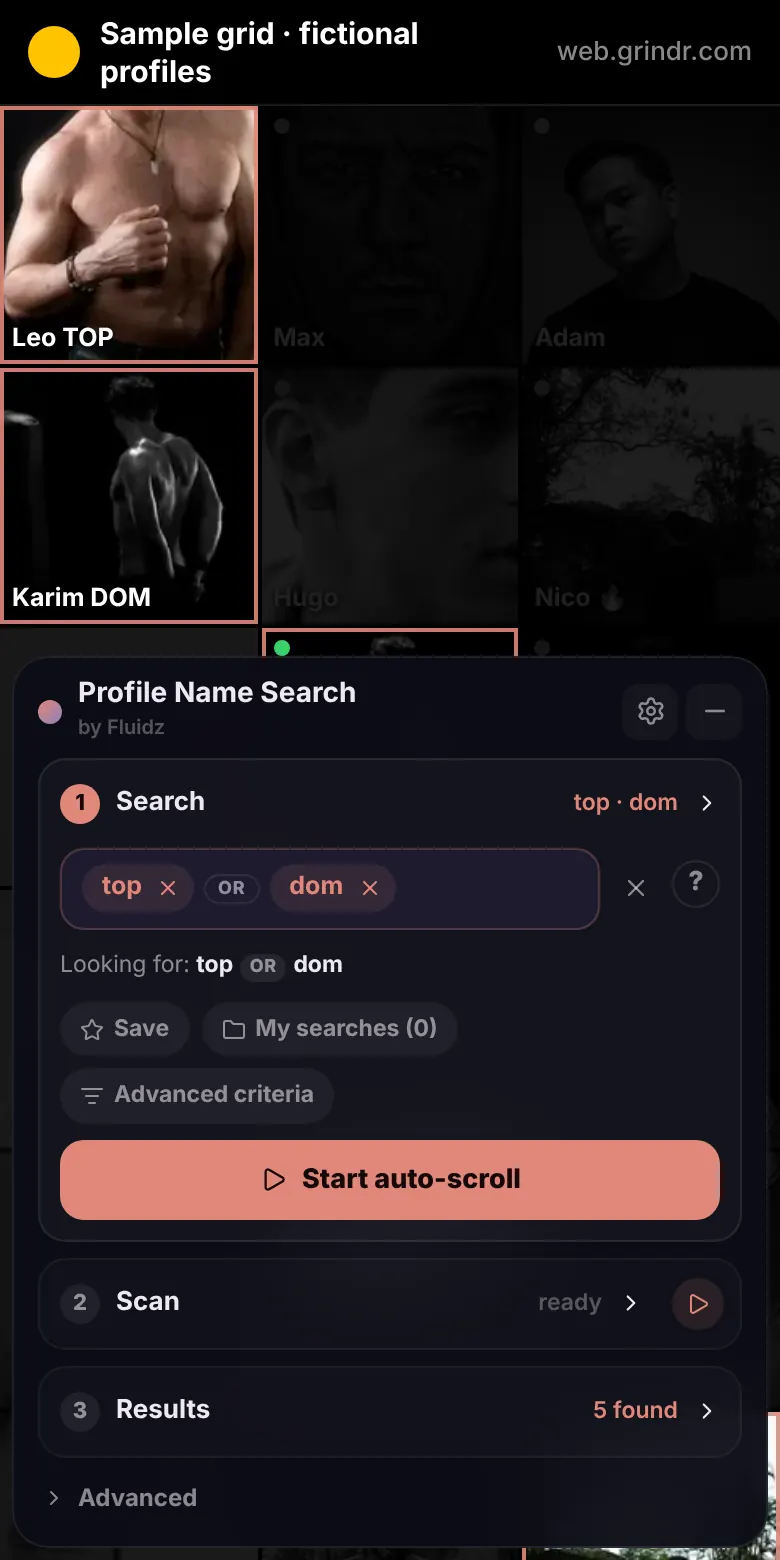
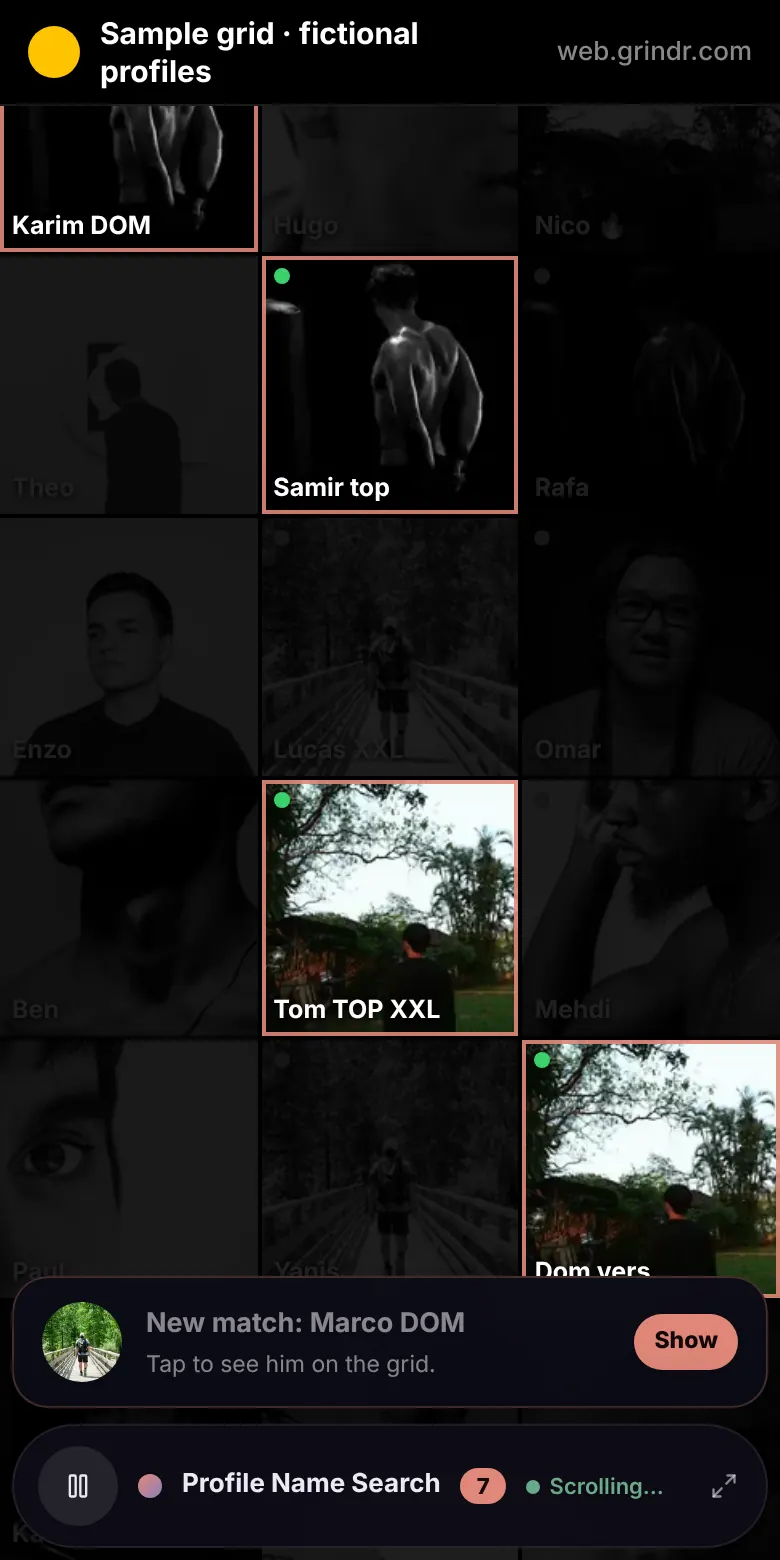
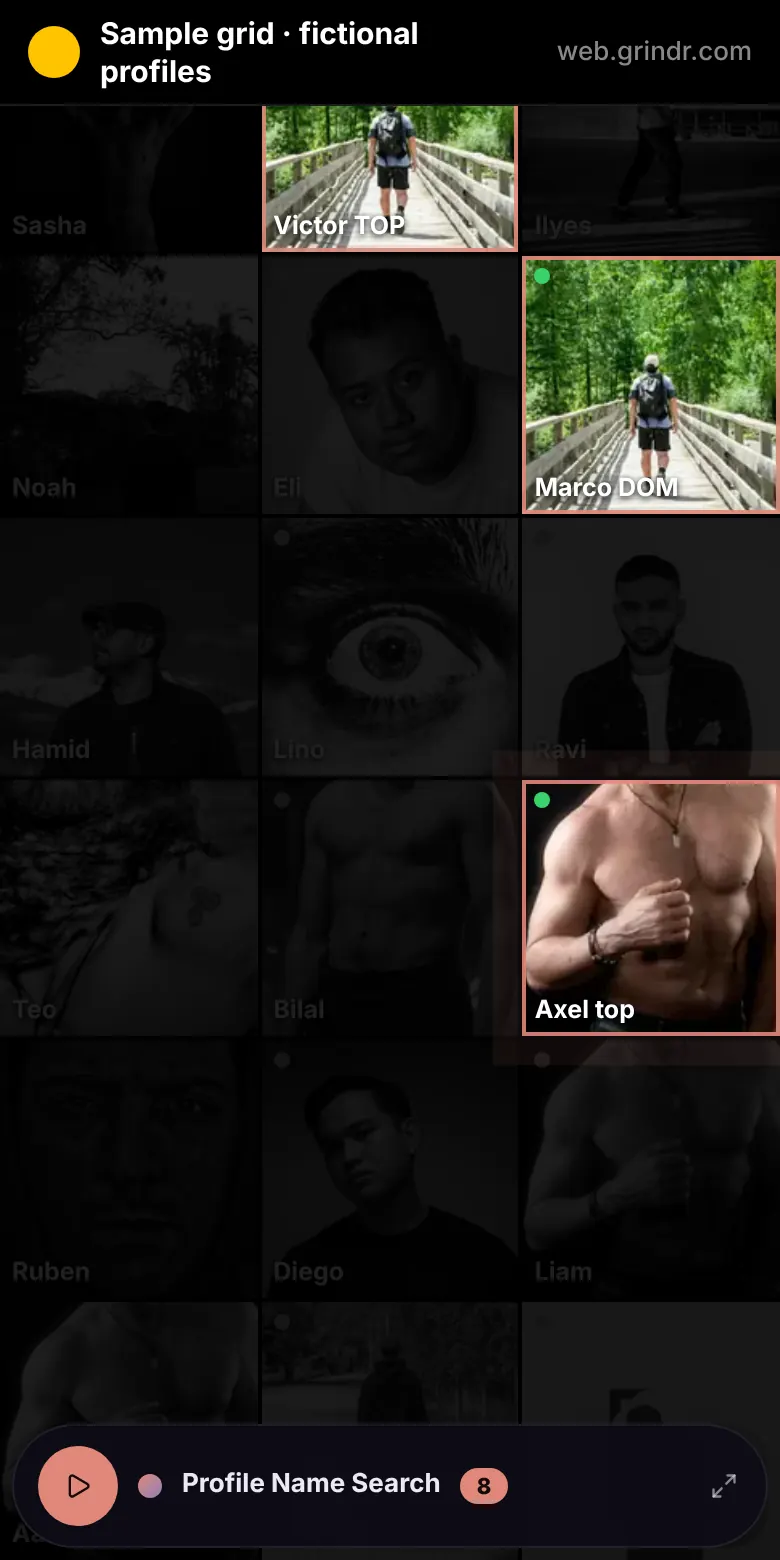
Real screenshots on a generated sample grid: fictional names, no real Grindr profile.
Search
Search like on Google.
Advanced search, step by step
One simple field by default. When you need more: groups of keywords, then how to combine them.
- Step 1: keyword groups — (top, dom, active): one of them is enough
- Step 2: combine them — all required (AND) or any (OR), without sub
- A reminder when the search gets too precise to find anyone
Scan
It scrolls, you watch.
Matches outlined on the grid
A coral outline marks every match on Grindr’s own grid.
- Gentle speed, 30-minute limit by default
- Pause on every match — your choice
- Resume if Grindr crashes or empties the grid
- Skip who you already favorited
Version 3.0 · just out
New in 3.0: ten things 2.x couldn’t do.
Released in November 2026. Your saved searches move over by themselves; nothing to reconfigure.
Three numbered steps
Search, Scan, Results: open one, or all three.
Synonyms, AND, exclusions
(top, dom) + XXL -sub, in one search.
Saved searches in folders
Unlimited, pinned, sorted into folders.
Scan journal & Find again
20 scans kept 30 days, on your computer.
Compare & new since last time
See who is new since your last scan.
To review / Ignore
Ignored profiles leave the results.
Discreet mode & journal PIN
Photos and names blurred until you hover.
Safer long scans
A time limit, and Resume if Grindr crashes.
Keyboard shortcuts
Start, pause, next match: Alt+Shift.
My data, backup, self-test
Export, import or erase in one click.
Free, and installed in two minutes.
Why you can trust it
It reads your screen. It tells nobody.
- No network calls
- Searches stay in your browser
- It doesn’t read your messages
- Never acts on its own
- Respects hidden distance
- Readable code
Installation
Install it in a few minutes.
On a computer it’s an extension; on a phone, a small script in your browser.
It isn’t on the Chrome Web Store, so you add it by hand. It takes two minutes.
- You need:
- A computer
- Chrome, Brave, Edge or Arc
- Grindr Web
Firefox and Safari can’t run it yet: open this page in Chrome, Brave, Edge or Arc.
-
Enter your e-mail, open the link on your computer, then download and unzip the .zip.
Get the link by e-mailDetails
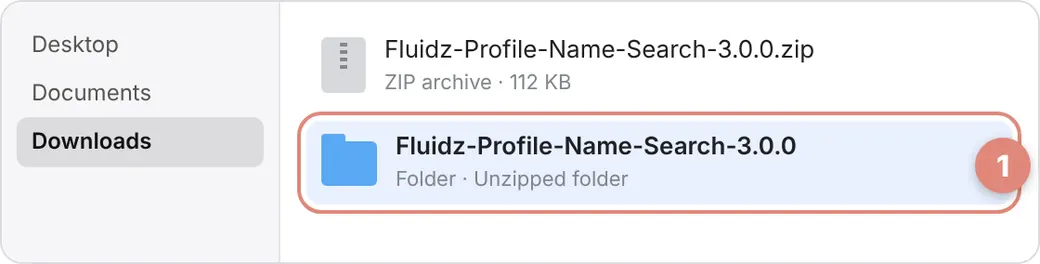
Enter your e-mail at the top of this page. We send a one-time link: open it on your computer and the download appears right here. Chrome can’t read a .zip file, so unzip it first. On a Mac, double-click the .zip: a folder “Fluidz-Profile-Name-Search-3.0.0” appears in Downloads. On Windows: right-click the .zip → Extract All → Extract.
Keep this folder where it is (Downloads or Documents): Chrome reads the extension from it every time. If you delete or move it, the extension stops.
-
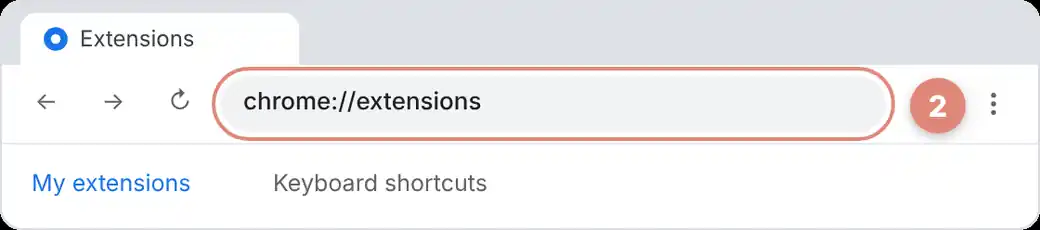
Copy this address, paste it into Chrome’s address bar and press Enter.
chrome://extensionsDetails
Why copy and not a link? For security, Chrome blocks websites from opening this page. Other way: menu ⋮ → Extensions → Manage extensions.
-
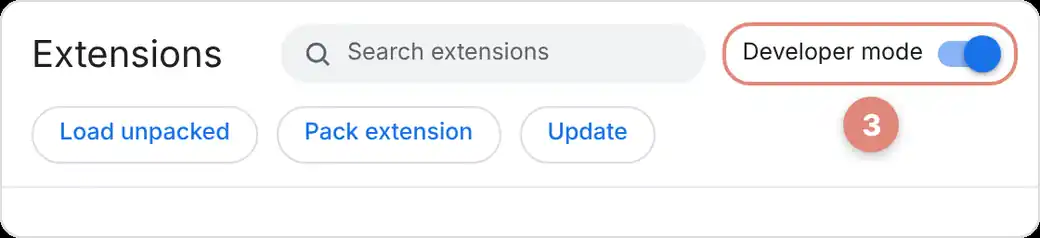
Top-right of the page, switch on “Developer mode”. Three new buttons appear on the left.
Details
Developer mode only lets you load extensions from a folder. You can switch it off later — but then the extension stops.
In Edge, the Developer mode switch is in the left column of the page.
-
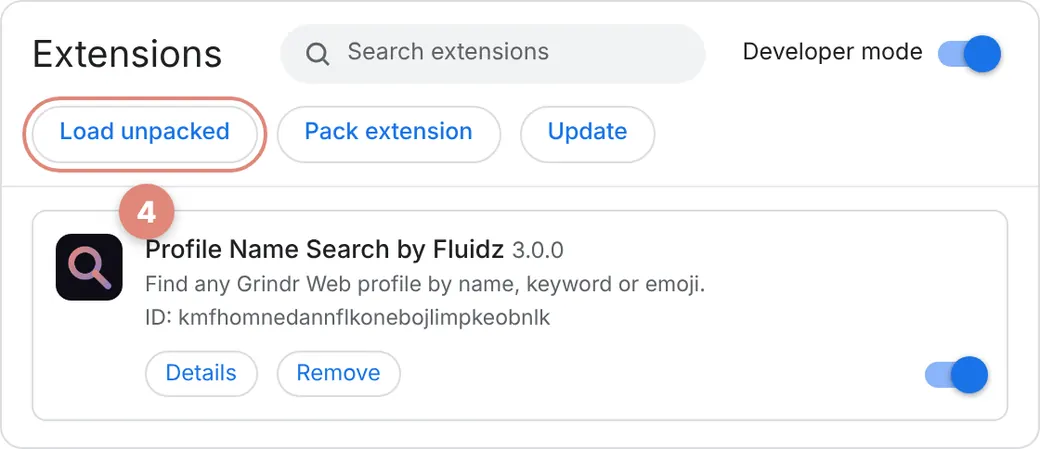
Select the unzipped folder, the one that contains manifest.json — not the .zip.
Details
Click “Load unpacked” (top-left). In the window that opens, select the unzipped folder — not the .zip — the one that directly contains manifest.json, then click Select.
Got “Manifest file is missing”? You picked the wrong level: open the folder once more and select the one inside.
-
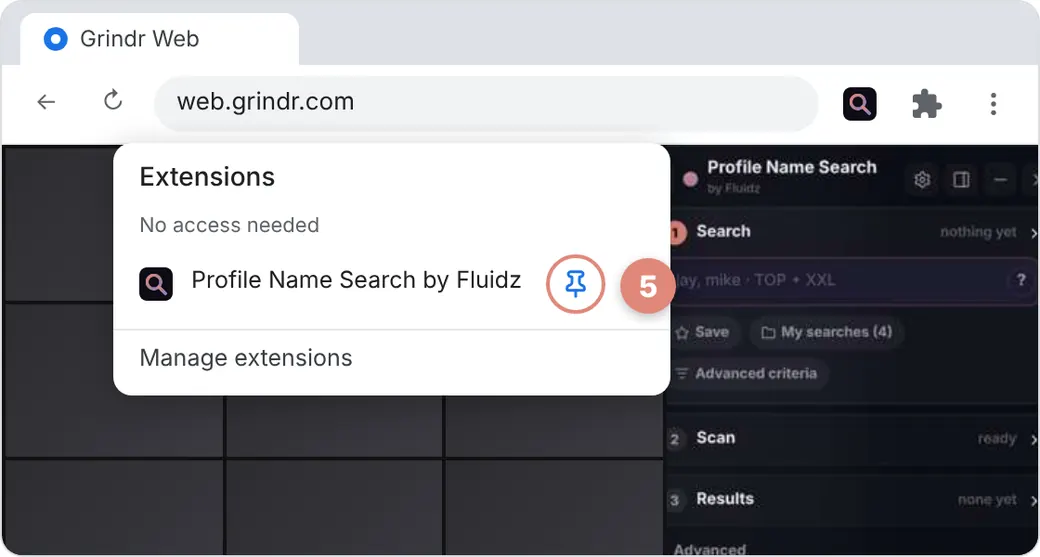
Pin the icon in Chrome’s toolbar, then open web.grindr.com: the panel appears.
Open web.grindr.com ↗Details
Click the puzzle icon in Chrome’s toolbar, then the pin next to Profile Name Search: its three-drop Fluidz icon stays in your toolbar. Click it anytime to show, hide or reset the panel. Then open web.grindr.com — the panel appears with a short 4-step welcome.
Already had Grindr Web open? Reload the tab (⌘R / Ctrl+R) so the panel shows up.
In Arc, the extension’s icon is in the extensions menu at the top of the sidebar.
Already installed? Updating
- Export a backup first (⚙ → My data). Then unzip the new download and replace the content of your existing extension folder with the content of the new one: Chrome keeps reading that folder.
- Open
chrome://extensions. - Click the reload arrow ↻ on the extension’s card. Don’t click Remove: your saved searches stay.
Coming from 2.x? Your saved searches, tab, language and settings move to 3.0 by themselves, and a “What’s new” card shows once.
Install the free Userscripts app
Open it once and pick a folder (for example “Userscripts” in iCloud Drive).
Download on theApp StoreTurn it on in Safari
Settings → Apps → Safari → Extensions → Userscripts: turn it on and set web.grindr.com to “Allow”.
Install the script
Open the link from your e-mail in Safari on this phone, tap “Install the script”, then aA in the address bar → Userscripts → Install.
Install the scriptGet the link by e-mailOpen Grindr Web in Safari
Sign in on web.grindr.com: the panel appears at the bottom of the screen.
Open web.grindr.com ↗
Chrome on iPhone can’t run scripts: use Safari.
Install the script
Open the link from your e-mail in Firefox on this phone and tap “Install the script”: Violentmonkey opens its page → Install.
Install the scriptGet the link by e-mailOpen Grindr Web in Firefox
Sign in on web.grindr.com: the panel appears at the bottom of the screen.
Open web.grindr.com ↗
FAQ
Questions we get a lot.
Is it safe?
The download is a zip of about 110 KB: plain, readable JavaScript, nothing minified. The extension only asks Chrome for local storage, only runs on web.grindr.com, and makes no network requests — nothing leaves your browser. Open content.js in any text editor to check.
Can I get banned from Grindr for using it?
No tool can promise that. Grindr’s terms are strict about third-party tools. Profile Name Search never acts for you — no favorites, no messages, no taps — it only reads the names already on your screen and scrolls the grid. But auto-scroll is a grey zone, so use it at your own discretion.
How much does it cost?
Nothing. It’s free, with no trial and no limit.
Does it work on my phone?
Yes, in beta. On iPhone it runs in Safari with the free Userscripts app; on Android, in Firefox with Violentmonkey. Enter your e-mail on your phone and open the link there: you get the mobile version and a step-by-step install guide. On a computer, it’s the extension for Chrome, Brave, Edge or Arc.
Why do you ask for my e-mail?
It’s how we send you the download link — the extension for your computer, or the mobile version on your phone — and how we can tell you when a new version is out. The link creates a free Fluidz account, with no password. You only get news if you tick the box, and we never sell or share your address.
How do I use it well?
On your first visit to Grindr Web, a 4-step welcome walks you through it, starting with “Get your grid ready”. ⚙ → Replay the tour shows it again anytime.
- Open Grindr Web, filter, then search Open web.grindr.com in grid view and apply your Grindr filters first (position, age, favorites, online…). The panel appears: type what you’re looking for and start.
- Type names, keywords or emojis “TOP”, “DOM”, “🚀”… Combine them: a comma (OR), a + (AND), -word to leave a word out, (a, b) for synonyms. See the examples below, or press ? in the panel.
- Start auto-scroll and let it load It scrolls the grid for you and loads new profiles. Leave it running: the counters show how many profiles were scanned and found. Scan speed: Gentle (the default) takes short breaks to keep Grindr Web happy. Fast is the old pace and can disconnect Grindr Web’s chat.
- Pause, check, resume Pause anytime (or let it pause on each match) to look at the profiles found, then press Resume to continue down the grid.
- The end of the grid When it stops, you’ve seen every profile Grindr shows you: that’s the limit of your Grindr plan, not of the extension. For more profiles, upgrade your Grindr plan.
Three tabs above the results — All, Favorites and Not favorites. Pick “Not favorites” to skip the guys you already favorited: the list, the grid outline and the auto-scroll pauses all follow the tab.
Best option: open it in Chrome’s side panel (toolbar icon → “Open in Chrome’s side panel”). It sits next to the page and never covers the grid. Prefer it floating over the page? Drag it by its handle (top or bottom), shrink it to a bubble, or park it on the screen edge. Lost it? Toolbar icon → Reset panel position.
Search like on Google
It searches the name shown on each profile card — so names, keywords and emojis all work. Upper or lower case doesn’t matter.
subA wordEvery profile whose name contains “sub”: Sub, SUBBY, sub_bcn…dom topTags in namesMany guys put tags in their name: DOM TOP, vers, bear… Search them like a name.🚀An emoji🚀, 🌴, 😈… emojis in names work too.top, xxlOR — commaEither one: profiles with TOP or XXL in their name, in one pass.dom + topAND — plusBoth words, any order: “DOM TOP 🚀” and “top dom” match, “dom” alone doesn’t."dom top"Exact phraseOnly these words, in this order.(top, dom, active) + XXLSynonymstop, dom or active, and XXL somewhere in the name.TOP -XXLLeave out — minusTOP, but never with XXL.=topWhole word“top” as a word: “laptop” doesn’t match. The editor has the same switch on each word.
Why isn’t it on the Chrome Web Store?
Grindr’s terms are strict about third-party tools. Profile Name Search never acts on its own — it only searches, scrolls and shows you a match when you ask — but auto-scroll is enough of a grey zone to keep it off the store. So we ship it directly, with plain, readable code and no network calls. Use it at your own discretion.
Which browsers?
Google Chrome, and browsers built on it that accept Chrome extensions: Brave, Edge, Arc. Not Safari or Firefox.
How can I see more profiles?
Grindr decides how many profiles load, depending on your plan. When the scroll stops, you’ve seen every profile Grindr shows you: that’s the limit of your current Grindr plan, not of the extension. To load more profiles, upgrade your Grindr subscription. The extension can only read what Grindr shows.
How do I update it?
Export a backup first (⚙ → My data). Then unzip the new download over the same folder, open chrome://extensions and click the reload arrow ↻ on its card. Don’t click Remove: removing deletes its data. Your saved searches are kept. Tick the box in the form to hear about new versions.
I used version 2. Will I lose my saved searches?
No. Unzip 3.0 over the same folder and reload it: your saved searches, current search, tab, language and settings move over by themselves, and the panel says “Your searches were kept”. Keep the same folder: Chrome links the extension’s data to it.
What does the extension store, and where?
Only on your computer, in Chrome’s local storage: settings, saved searches and folders, your marks, and the scan journal (names, photo links and dates — never the photos), 20 scans for 30 days. ⚙ → My data shows it, exports it to one backup file and erases it.
Which languages?
English, Français, Español, Português, Italiano and Deutsch. You pick yours in the extension’s welcome and can change it anytime.
Stuck? It’s usually one of these.
I don’t see the panel on Grindr Web.
Reload the tab (⌘R / Ctrl+R). Check that the extension’s switch is blue in chrome://extensions and that you’re on web.grindr.com — not the phone app.
Chrome says “Manifest file is missing or unreadable”.
You selected the wrong folder. Pick the folder that directly contains manifest.json (often the one inside the first folder).
I can’t find “Load unpacked”.
Developer mode is off: turn on the switch top-right of chrome://extensions and the button appears top-left.
Chrome shows a warning about developer-mode extensions.
That’s normal for any extension not installed from the store. Click × to dismiss it; it doesn’t affect anything.
Auto-scroll doesn’t move.
Scroll the grid a little by hand first, then press Start again. Grindr sometimes loads slowly.
Grindr Web chat got disconnected after a search.
It can happen after a long, fast scan: Grindr Web may drop its chat connection while thousands of profiles load. We can’t reproduce it ourselves and we don’t control Grindr’s side, so we can’t say for sure what triggers it or promise it’s gone. To get your chat back, reload the Grindr tab (⌘R / Ctrl+R): you stay signed in. For long chats, turn the extension off in chrome://extensions (or use another Chrome profile), or use the Grindr phone app. Since version 2.1.0 the scan is gentler: Scan speed is on Gentle by default, with short breaks taken automatically, while Fast (the old pace) may cause it. To update, download the new .zip and replace the content of your existing folder.
The panel says “Grindr stopped responding”.
Grindr crashed or emptied the grid during a scan, so the scan paused and kept its results in the journal. Reload the Grindr tab if needed, then press Resume. After a reload, an unfinished scan is offered again.
The scan stopped by itself.
It reached the scan time limit (30 minutes by default, set in ⚙). Press Resume to go on, or pick another limit. If the panel warns that Grindr Web is open in another tab, close the other tab: use one tab at a time.
Free · link by e-mail
Get Profile Name Search
A gift from Fluidz
This extension is a gift. Fluidz is the app.
On Grindr, you find guys. On Fluidz, you throw the party: one link, you see who is coming and you choose. Between men, by invitation.